
Cua Volume
One versioned drive per account, shared by every Space and agent: agent memory and outputs that outlive any Space, with default access rules, grants you approve, and an audit log.
One versioned drive per account, shared by every Space and agent: agent memory and outputs that outlive any Space, with default access rules, grants you approve, and an audit log.
Cua Volume keeps what outlives a Space: a persistent agent's memory, its outputs, and files the user shares with every Space. A cloud Space's disk goes back to the pool on release; the drive does not.
| Folder | What it holds |
|---|---|
public/ | Shared reference: docs, datasets, house rules, skills |
agents/<agent>/ | One persistent agent's home: memory, outputs/, inbox/ |
spaces/<space>/ | Per-Space scratch and outputs (local:work is spaces/local-work/) |
Every write is a new version. Deletes leave a marker, so history and restore still reach the old content.
| Principal | public/ | agents/<self>/ | agents/<other>/ | spaces/<this>/ | spaces/<other>/ |
|---|---|---|---|---|---|
| You (app, CLI, agents on your machine) | rw | rw | rw | rw | rw |
| Agent A in Space S | r | rw | none | rw | none |
| Space S, no agent | r | none | none | rw | none |
Anything wider is a grant: a principal, a folder or file, r or rw, and an
optional expiry. Only you grant, and every grant asks for Touch ID, your
login password or the Keyvault passphrase first. An agent that needs more
files a request; you approve it (with presence) or deny it.
The daemon checks every read, write and listing before it touches storage. An agent in a Space never holds keys to the drive.
cua volume ls agents/
cua volume put public/rules.md ./rules.md
cua volume cat agents/ada/memory/MEMORY.md
cua volume history agents/ada/memory/MEMORY.md
cua volume restore agents/ada/memory/MEMORY.md 0001790683200000-1a2b3c4d
cua volume ls --as agent:ada --space local:work
--as shows the drive exactly as that agent sees it. It only narrows.
cua volume grant agent:researcher agents/writer/outputs/
cua volume grant space:local-build public/datasets/ --rw --for 2h
cua volume grants
cua volume requests
cua volume approve 5f2c9a0b1d3e4f67
cua volume revoke 5f2c9a0b1d3e4f67
cua volume audit
See the cua volume reference.
The drive methods live on Spaces; a DriveView takes an agent's view.
They ask the Cua Spaces daemon, which runs the drive; an SDK runtime without
Cua Spaces raises HostCapabilityMissing.
import cua

spaces = cua.connect().spaces()   # the Cua Spaces daemon
await spaces.volume_write("public/rules.md", b"be kind", None, False, None)
ada = cua.DriveView(as_agent="ada", in_space="local:work")
await spaces.volume_write("agents/ada/memory/MEMORY.md", b"likes tea", None, False, ada)
try:
    await spaces.volume_read("agents/bob/notes.md", None, ada)
except cua.CuaError.PermissionDenied:
    print("ada may not read bob's home")
print([e.path for e in (await spaces.volume_ls("agents/", ada)).entries])
# expect: ['agents/ada/']
Every tool is also on the Spaces MCP server (volume_ls, volume_read,
volume_write, ...): see the volume tools reference
and the SDK reference.
Writes under agents/ are scanned for API keys, tokens and private keys. A
hit is refused with secret_detected, naming the kind and the line, never
the value, and the audit log records it. Agent homes never sync harness
credentials (.env, auth.json, credentials/, vault/). Keep secrets in
the Keyvault.
cua volume audit lists grants, revocations, requests, refusals, blocked
secrets, syncs, leases and every agent read and write, newest first. Each
line's hash covers the previous one, so an edited or truncated log reports
that it does not verify.
Cua Volume is becoming Cua Volume. The mounted volume already carries the
new name; the cua volume commands and drive_* tools keep their names for
now.
The drive can appear as a volume named Cua Volume, so any app opens its files in place. It is off until you turn it on in Cua (Settings > Storage) or from a terminal:
cua volume mount
cua volume status
cua volume unmount| System | How it mounts | Where |
|---|---|---|
| macOS | A local NFS server inside the daemon, mounted with the system's own client. No kernel extension and no approval step | ~/Cua Volume, listed in Finder under Locations |
| Linux | FUSE | ~/cua-volume |
The setting survives restarts: the daemon mounts the volume when it starts and unmounts it (after pending uploads land) when it stops.
What happens underneath:
~/.cua/volume/cache,
10 GiB by default, least recently used first). When an app reads
sequentially, as a player or an editor does, the drive fetches ahead of it,
so a 4K video starts in well under a second instead of after a full
download.cua volume put..DS_Store and ._* files are kept on
this Mac and never upload.Measured on an Apple M5 Max (macOS 26.5) through the mounted volume, each number from a cold start (the block cache cleared and the volume remounted). The videos are 4K H.264 at 150 Mb/s with the index at the end of the file, as cameras write it: 1.04 GB (56 s) and 10.4 GB (9 min 20 s). "Cloud" is a local MinIO behind a proxy that adds 25 ms each way and caps each connection at 50 MB/s. "Download first" is a full download with 8 parallel ranged requests, then the same step on the local copy.
| Store | File | Probe (ffprobe) | Frame at 50% | Decode 10 s from the middle | Download first, then probe |
|---|---|---|---|---|---|
This Mac (fs) | 1 GB | 0.04 s | 0.11 s | 0.49 s | 0.40 s |
This Mac (fs) | 10 GB | 0.10 s | 0.21 s | 1.09 s | 5.7 s |
| MinIO | 1 GB | 0.10 s | 0.20 s | 1.17 s | 0.35 s |
| MinIO | 10 GB | 0.08 s | 0.18 s | 0.72 s | 7.5 s |
| Cloud | 1 GB | 0.49 s | 0.50 s | 1.17 s | 3.3 s |
| Cloud | 10 GB | 0.35 s | 0.34 s | 1.14 s | 32.6 s |
| Store | File | Sequential read | Random 4 KiB read, p50 / p95 | Cache hits during the 10 s decode |
|---|---|---|---|---|
This Mac (fs) | 10 GB | 1,324 MB/s | 1.1 / 1.8 ms | (no cache: already local) |
| MinIO | 10 GB | 737 MB/s | 3.1 / 4.0 ms | 85% |
| Cloud | 10 GB | 212 MB/s | 76 / 92 ms | 42% |
A folder of 10,000 files lists through the volume in 0.18 s (fs) and
0.47 s (MinIO) the first time, and in about 1 ms after that.
The benchmark is libs/cua/crates/cua-volume/bench/drive_bench.py; it prints
the full set of numbers, including 1 GB rows and sync latency.
Every Space mounts the same volume, so a program in the guest reads and writes it like any folder. The guest sees only that Space's view (the Space's row in the table above, or its agent's), and it never holds keys: your machine serves the view over the Space's own connection and applies the access rules, the audit log and the secret scanner there.
| Guest | How it mounts | Where |
|---|---|---|
| macOS | The system's own NFS client | ~/Cua Volume |
| Linux | FUSE (the image's root volume helper mounts it) | /volume, else ~/Cua Volume |
| Windows | Coming soon. Until then, agents in a Windows Space use the volume_* tools |
The mount goes away when the Space detaches the volume, when its session is
revoked and when the guest's cua-spacesd stops. cua-spacesd doctor checks
the mount end to end (volume.mount).
Two machines using the same bucket see each other's changes within
seconds. Each change is also written to a small change log in the bucket
itself (.cua-feed/), and every machine checks it with a single listing
request, twice a second while things change, backing off to every 5 seconds
when idle. No Cua service is involved; it works with your own S3, R2 or
MinIO bucket.
Measured with two cua homes on one MinIO bucket (20 rounds each): a change made on one reaches the other's daemon in 0.50 s at the median and 0.50 s at p95 for a 1 KiB file, and shows in the other's mounted volume 2 ms to 5 ms later. A 64 MiB file shows 0.32 s after its upload finishes (p95 0.34 s). While nothing changes, the check backs off, so the first change after a quiet period can take up to 5 seconds.
When two machines change the same file, the write that reaches the bucket
last becomes the current version, and the other one is kept next to it as
name (conflict from <machine> <date>).ext. Both stay in the file's
history. Nothing is dropped silently.
cua volume status --jsonKeep the change log small with a bucket lifecycle rule that expires
noncurrent versions under .cua-feed/ after a day. Each machine already
deletes feed entries older than a day.
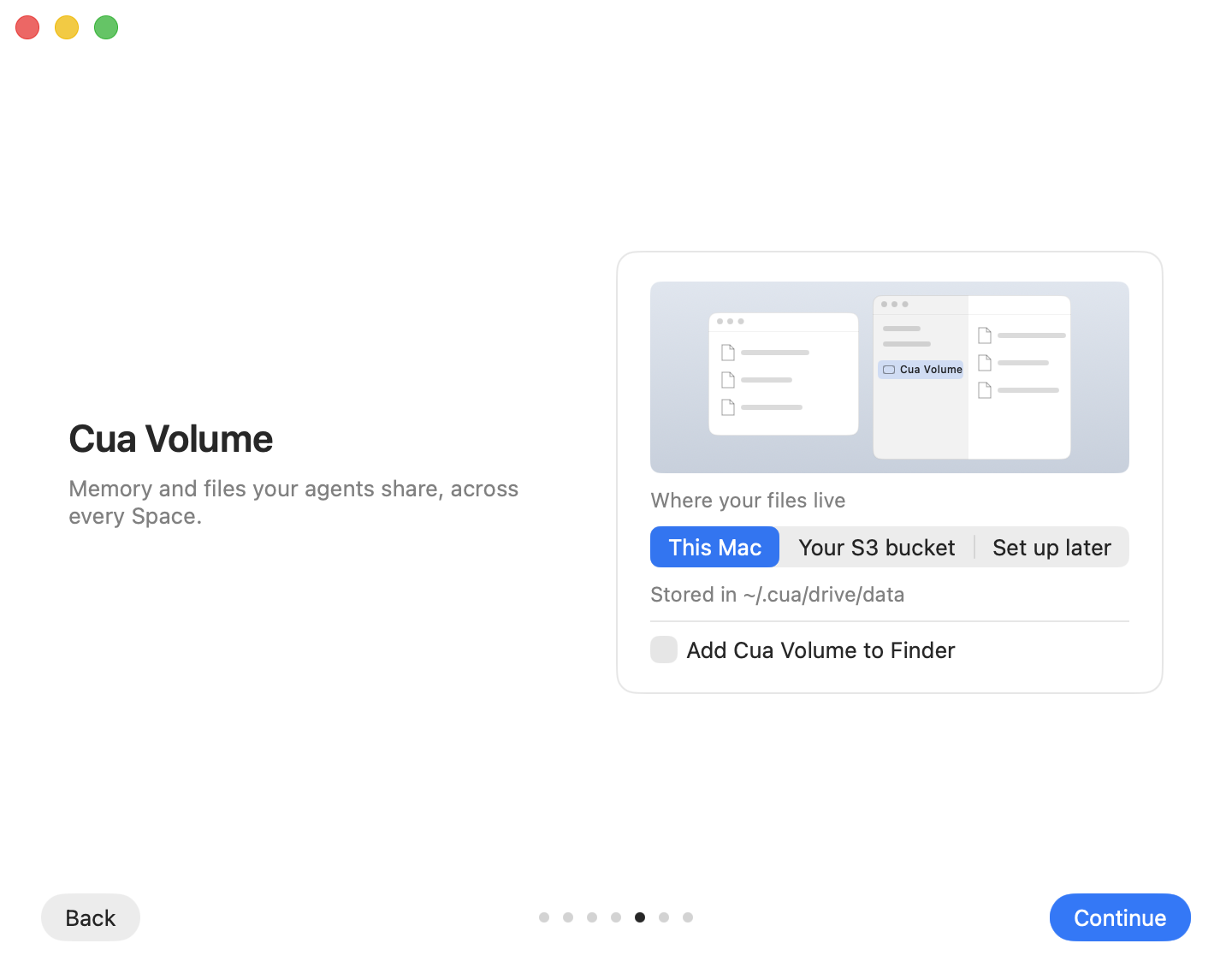
First run. The Cua Volume page asks where your files live: This Mac (the default, with the folder it uses), your own S3 bucket (AWS S3, R2, MinIO or any S3-compatible store), or later in Settings. Its one checkbox, Add Cua Volume to Finder (on Linux, Mount Cua Volume), is off by default; ticking it mounts the volume when you continue. Windows has no mount yet, so the page does not show there.
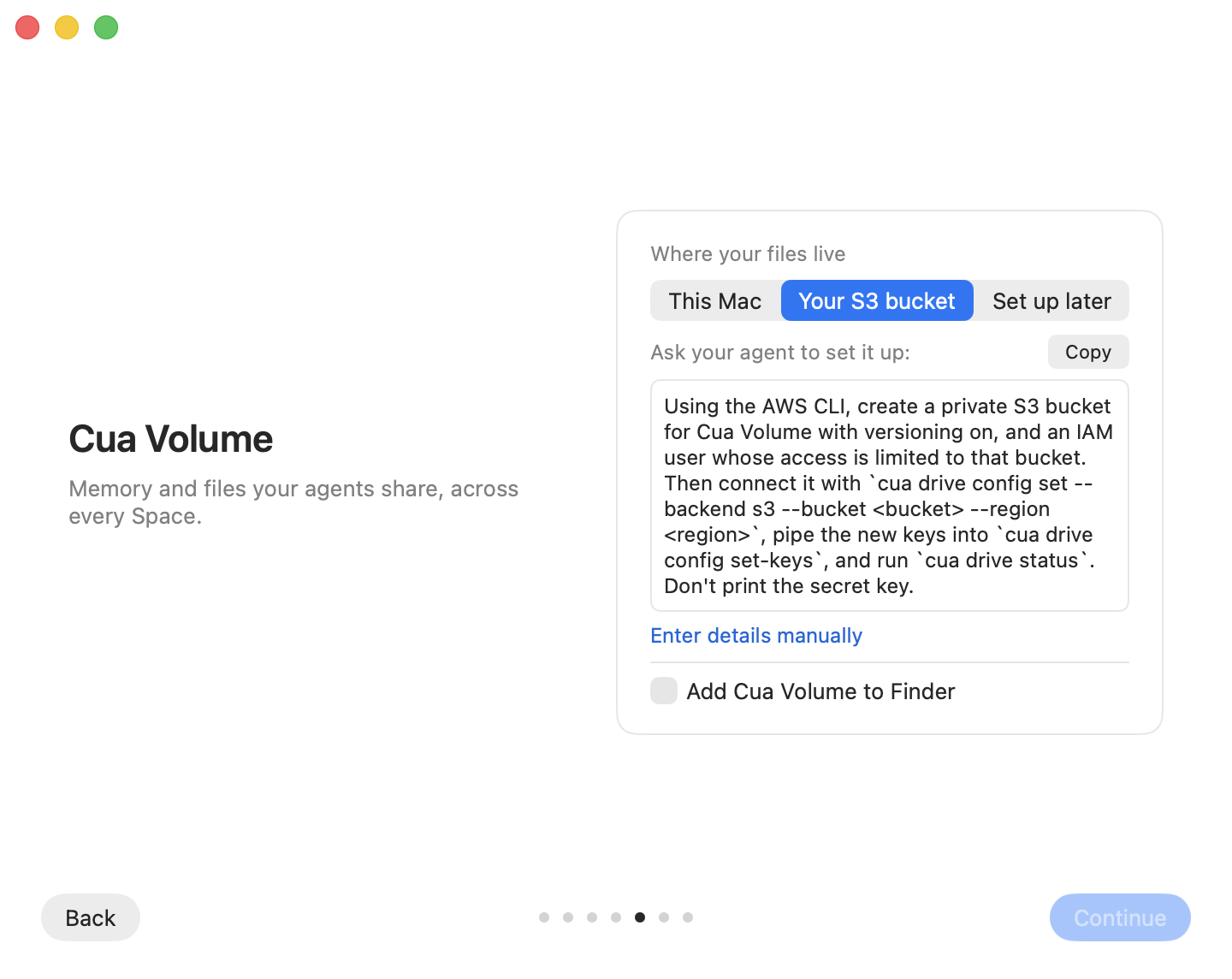
For your own bucket the page offers a prompt to give your coding agent: it
creates a private, versioned bucket and a user limited to it with the AWS
CLI, then connects it with cua volume config set and cua volume config set-keys. The app notices the bucket as soon as it is configured and shows
"Connected, versioning on". Enter details manually shows the endpoint,
bucket, region and key fields with Test connection instead.
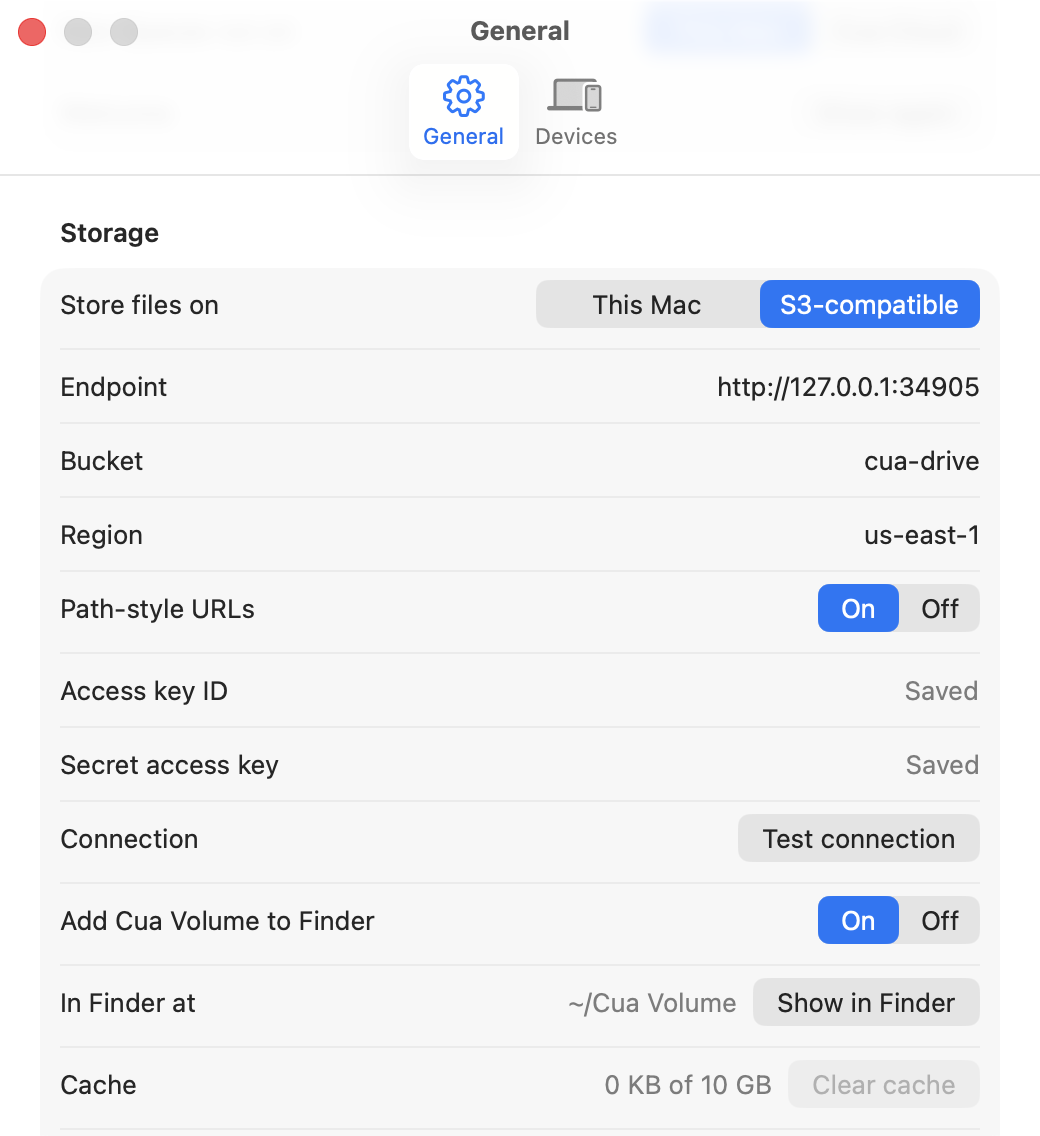
Settings, Storage. Where the files live, the volume, and the block
cache. Test connection checks the endpoint, the keys and bucket versioning
without saving anything. Keys go to the credential store, never to
config.json, and Save switches the running volume without a restart.
Menu bar. The menu shows the volume's sync state next to the number of Spaces (Synced, Syncing, Offline) and any conflicts, which open the Volume page. Nothing shows while the files stay on this Mac with no other device.
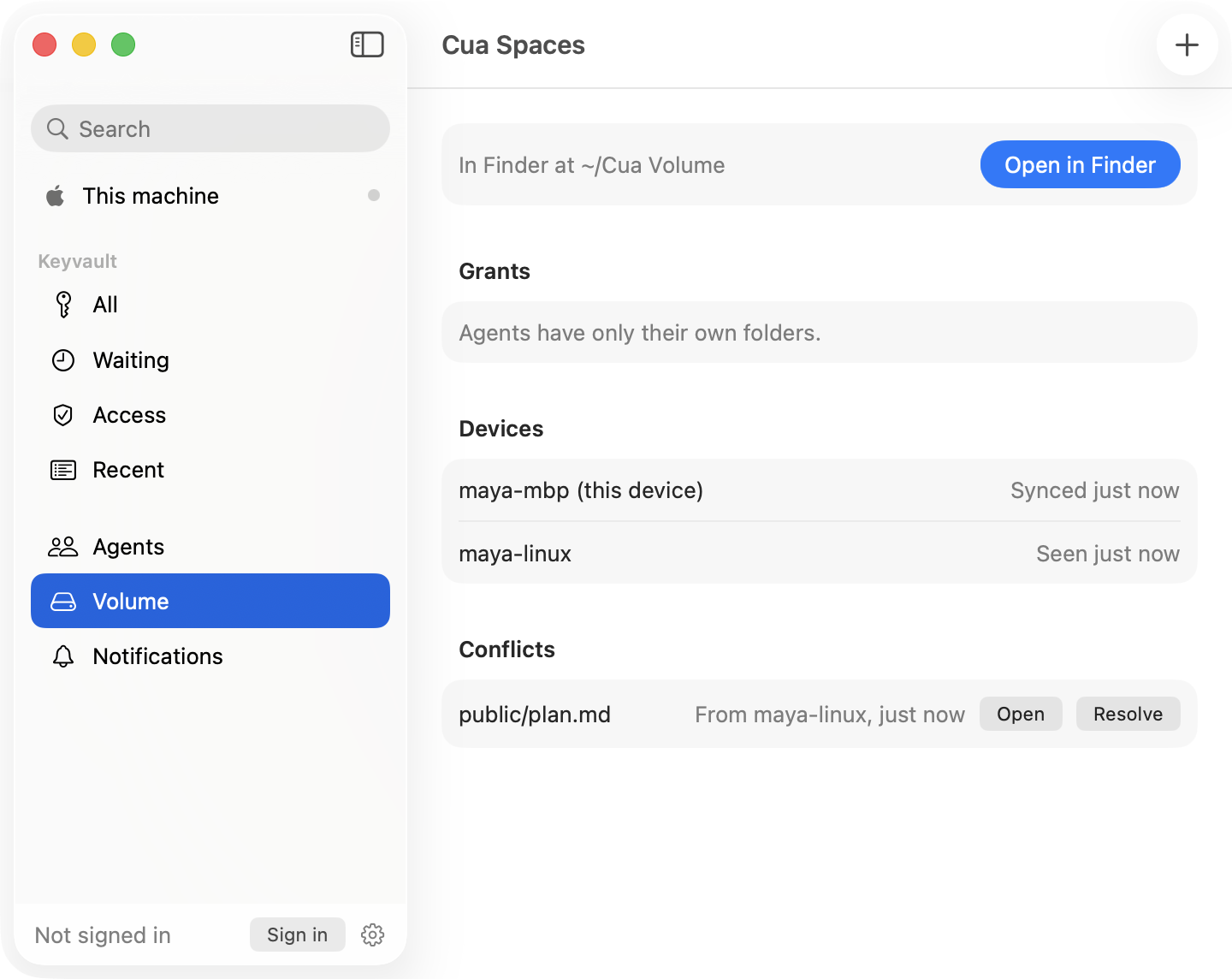
Volume page. Status, not a file browser: Finder is. Open in Finder shows the volume, mounting it first when it is not mounted. Devices lists every machine on the bucket, this one with its pending uploads and last sync. Conflicts lists files two machines wrote at once: Open shows the other copy in Finder, Resolve clears the entry and keeps both files.
| Backend | Where | Set up |
|---|---|---|
fs (default) | ~/.cua/volume/data on this machine | Nothing |
s3 | Any S3-compatible bucket with versioning on (AWS S3, R2, MinIO) | cua volume config set and cua volume config set-keys |
cloud | The Cua cloud's bucket, short-lived keys scoped to your folders | Off by default; the Cua cloud must enable Cua Volume for your account |
cua volume config show
cua volume config set --backend s3 --endpoint http://127.0.0.1:9000 --bucket cua-volume --path-style
cua volume config set-keys
set-keys reads the access key id and the secret from stdin and saves them in
the credential store; they never go in ~/.cua/volume/config.json. Restart the
daemon after changing the backend from the terminal. Settings > Storage in
Cua tests the bucket first (reachable, keys allowed to write, versioning on)
and switches the running drive without a restart.
The cloud backend is off until the Cua cloud turns on Cua Volume: the
server answers drive_disabled until then. When on, keys last 15 to 60
minutes and reach only the folders your session may use.
| Limit | Value |
|---|---|
| One read or write through a tool | 8 MiB |
| One file through the mounted volume | No limit (streamed; large files upload in 16 MiB parts) |
| Block cache | 10 GiB by default, at least 256 MiB |
| Path length | 1024 bytes |
| Agent names | 1 to 63 of a-z, 0-9, ., _, - |
| Requests waiting per agent | 8 |
| Cloud keys | 15 to 60 minutes, at most 12 folders |
| MinIO | a file and a folder cannot share a name (a and a/b) |