
Keyvault
The Cua Keyvault holds the sessions teleport moves and the passwords agents sign in with, per site and per account. Every use asks you first. Review items, approve requests, revoke access and turn it off from the Keyvault page.
The Cua Keyvault holds the sessions teleport moves and the passwords agents sign in with, per site and per account. Every use asks you first. Review items, approve requests, revoke access and turn it off from the Keyvault page.
The Keyvault is where Cua keeps the signed-in sessions that teleport moves into Spaces, and the saved passwords agents sign in with. It lives in the Cua daemon, encrypted on disk. Apps and agents never read it: they ask, you approve, and the daemon delivers into the Space.
Open Keyvault in the Cua Spaces sidebar.
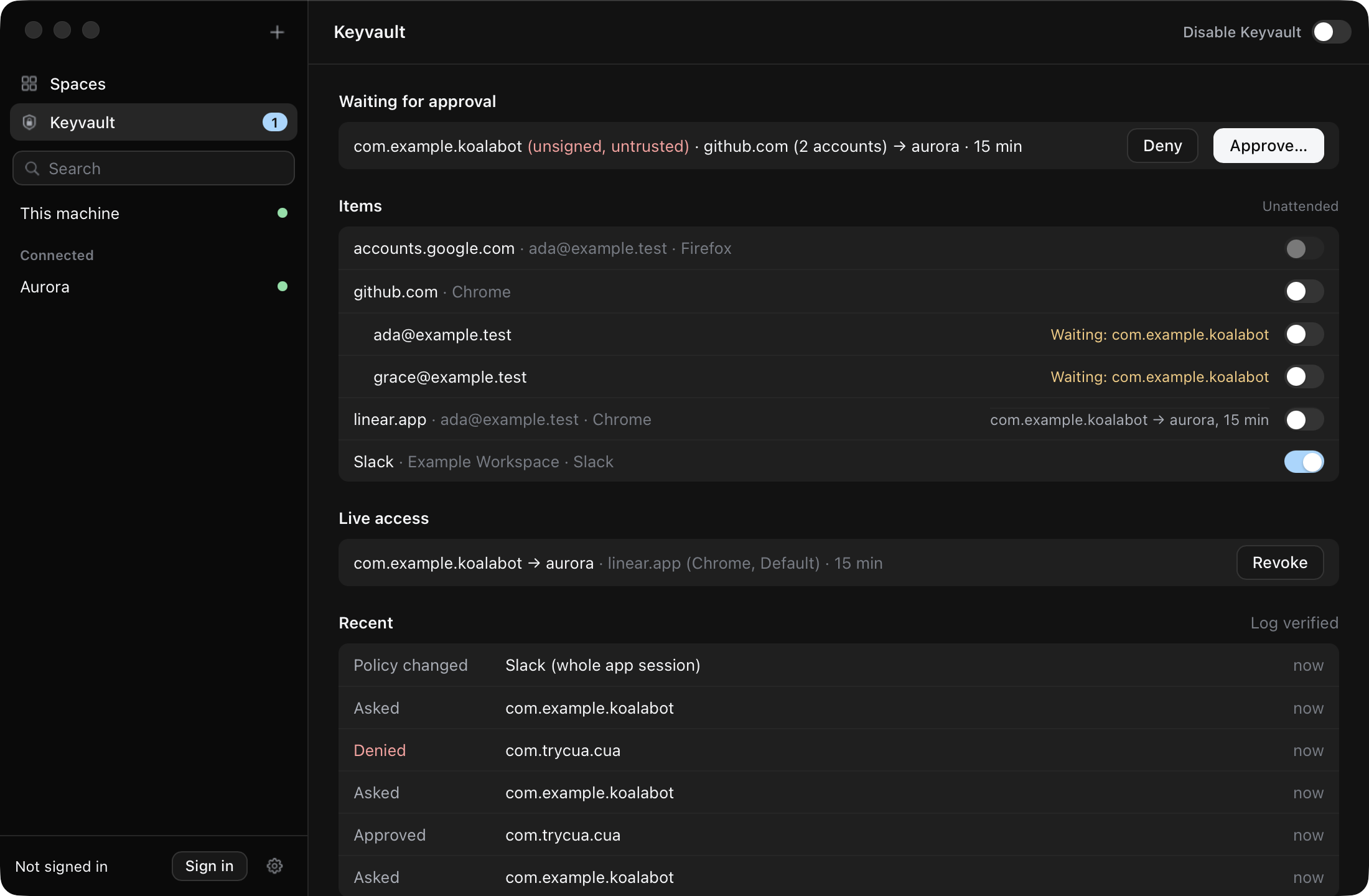
| Section | What it shows |
|---|---|
| Waiting for approval | Requests from apps and agents: the verified caller, what moves, where and for how long. Approve asks for Touch ID or your password. |
| Items | Saved sessions per site and per account. Unattended lets unattended rules use an item; it is off for every item until you turn it on. Identity providers always ask. |
| Live access | Grants, unattended rules and copies delivered to Spaces, with Revoke, Remove and Wipe. |
| Recent | Decisions from the audit log, and whether its hash chain verifies. |
| Protection | Who confirms (the Cua daemon, with Touch ID), how the vault unlocks, and whether this app and the daemon are verified as Cua. |
By default, every use of a saved session or password asks you first:
Import your browser's saved passwords, one item per site:
cua keyvault import-passwords --browser chromeThey stay sealed in the vault and are never delivered to a Space as files. An agent uses one only through site login: you approve the sign-in, and the Keyvault types it into the page on the saved login's own origin. Chrome on macOS and Linux is supported.
The Keyvault can also hold a site's cookies, decrypted from Chrome's Safe
Storage-encrypted store and kept sealed like any other item, per site rather
than the whole profile. Unlike a saved password, a delivered session's
cookies are meant to be used: when an agent's grant or unattended rule
delivers one into a Space, the Space's own Chrome gets its own freshly
created (or existing) Safe Storage key, and the cookies are re-encrypted
under THAT key before they land in its Cookies database -- the source
Mac's key is never copied anywhere. This capture path is reached today by
the teleport_app and teleport_browser_session MCP tools (an agent's
request, with your approval); the plain Teleport an app picker still
moves a session directly, without the Keyvault, and a first-party
cua keyvault import-session command for a human to use directly is tracked
as follow-up work.
Every request, approval, denial, delivery and sign-in is in the Keyvault's
hash-chained audit log (Recent on the Keyvault page). Site login records
login.request, login.authorize, login.fill and login.denied, with the
agent, the site's origin, the Space and a masked username. Passwords are never
logged.
Disable Keyvault stops every teleport, import and approval at once and
invalidates outstanding grants. A teleport_app request from an agent is
refused with disabled. Turning it back on asks for Touch ID.
The Keyvault only shows items to apps signed by Cua. A build signed by anyone else sees why, not the items. The vault key is wrapped by the macOS Keychain or a passphrase; this build does not use a Secure Enclave key, which needs a provisioning-profile-signed app.
First run: Set up Keyvault creates the vault and shows a recovery key once. Store it somewhere safe; Cua does not keep a copy.
How the vault key is protected depends on the Cua daemon:
| Daemon | Setup | Unlock |
|---|---|---|
| The signed Cua daemon on macOS | Touch ID; the key stays in your login keychain | Automatic, or Unlock |
| Any daemon that cannot use the OS key store | A passphrase of at least 12 characters, typed twice | The passphrase |
The page asks the daemon which one applies before anything else, so a setup it cannot do never asks for Touch ID. A passphrase goes only to the daemon, over the verified Keyvault socket; the apps never log or keep it. The recovery key also unlocks the vault.
The same from a terminal:
cua keyvault status
cua keyvault init               # the OS key store (signed daemon only)
cua keyvault init --passphrase  # prompts twice; never an argument
cua keyvault unlock --passphrase
cua keyvault lock
Scripts can pass the passphrase on stdin with --passphrase-stdin. See the
cua keyvault reference.
A debug cua daemon can trust a development build of the app instead of
Cua's signature. It never touches the login keychain, so its vault is
passphrase-only:
# The app build (and, for the CLI, a debug cua) by cdhash
export CUA_KEYVAULT_TEST_REQUIREMENT="$(apps/cua-spaces-macos/scripts/dev-keyvault.sh \
  "<path>/Cua Spaces.app" libs/cua/target/debug/cua)"
cua daemon start --foreground
Launch the app built with a debug libcua_sdk.dylib (CUA_SDK_DYLIB in
apps/cua-spaces-macos/scripts/build-app.sh) and
CUA_KEYVAULT_ALLOW_UNVERIFIED_DAEMON=1, which lets a debug client talk to
the unsigned daemon. Set the same variable for a debug cua keyvault.
Release builds ignore both variables.
See Teleport an app for what moves, and the
teleport reference for the teleport_app consent
flow.