

Use Cua in your own harness (no agent)
Drive a sandbox from your own agent loop or bot with no Cua agent layer. Create or connect, run commands, move files, take screenshots, click and type, from Python, TypeScript, Rust or any gRPC client.
The Cua SDK has no agent layer. It gives your code a computer, and your own harness decides what to do with it. Nothing here calls a model, and nothing needs to run inside the image besides cua-spacesd, which the Cua images ship.
| Language | Install | Agent code pulled in |
|---|---|---|
| Python | pip install cua-sandbox | None. cua-agent comes only with the cua[agent] extra |
| TypeScript | npm install @trycua/cua | None |
| Rust | cua-sdk crate, a git dependency for now (Rust crates) | None |
| Anything else | gRPC client generated from the .proto files | None |
The whole loop#
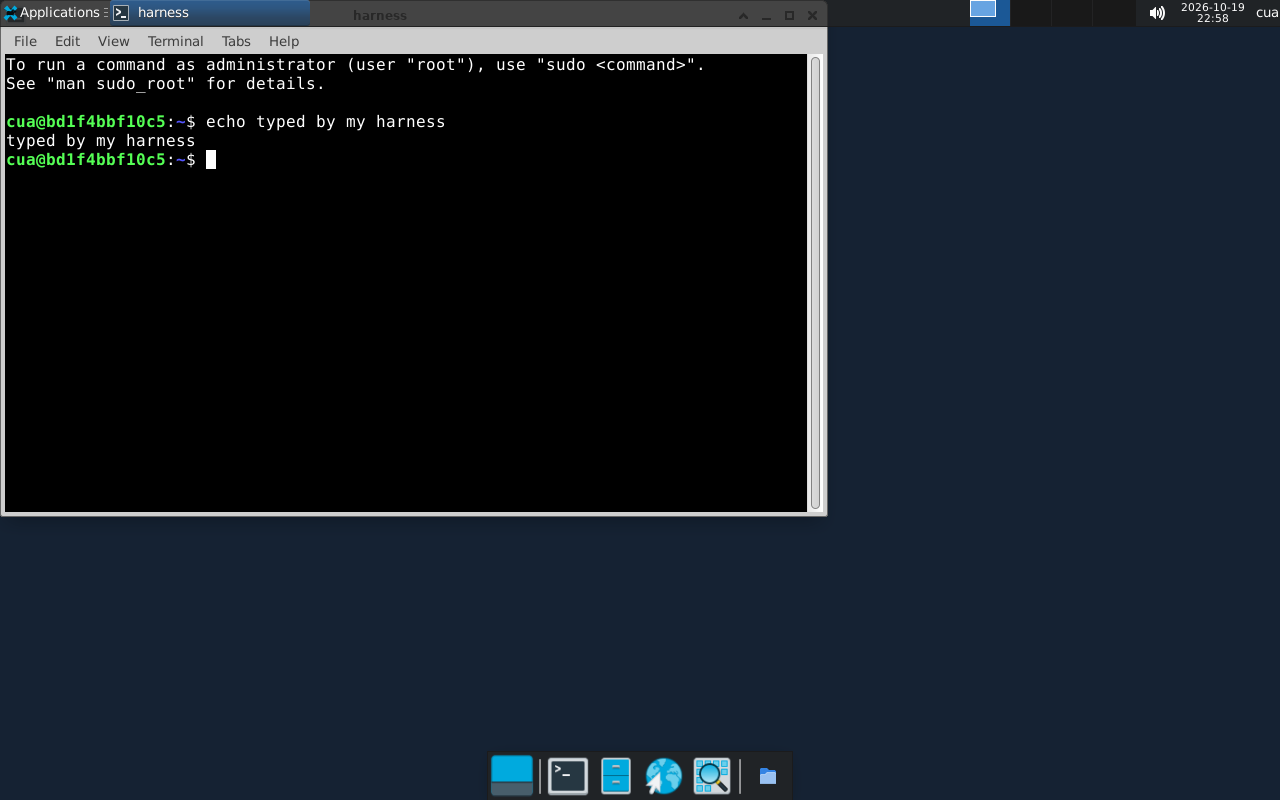
Each program below creates a Linux desktop on this machine, runs a command, writes and reads a file, clicks, types into a terminal, saves a screenshot, lists windows through the raw protocol, and deletes the sandbox.
pip install cua-sandbox      # Python 3.11 to 3.13
python harness.py
import asyncio
import json
from pathlib import Path
from cua_sandbox import Image, Sandbox
# Open a terminal titled "harness" and focus it, so typed keys land there.
OPEN_TERMINAL = (
"export DISPLAY=:1; setsid -f xfce4-terminal -T harness >/dev/null 2>&1; "
"xdotool search --sync --onlyvisible --name harness windowactivate --sync"
)
async def main():
# A Linux desktop on this machine. Leaving the block deletes it.
async with Sandbox.ephemeral(Image.linux()) as sb:
# Run a command.
result = await sb.shell.run("uname -sm")
print("exec:", result.stdout.strip())
# Write a file and read it back.
await sb.files.write_text("/tmp/note.txt", "hello from my harness\n")
print("file:", (await sb.files.read_text("/tmp/note.txt")).strip())
# Click, then type into a terminal.
width, height = await sb.get_dimensions()
await sb.mouse.click(width // 2, height // 2)
await sb.shell.run(OPEN_TERMINAL)
await sb.keyboard.type("echo typed by my harness")
await sb.keyboard.keypress("enter")
await asyncio.sleep(1) # let the terminal draw
# Screenshot (PNG bytes).
Path("screen.png").write_bytes(await sb.screenshot())
print("screenshot:", width, "x", height)
# Any cua.env.v1 RPC without a typed method: proto3 JSON in and out.
spacesd = await sb.spacesd()
reply = await spacesd.call_json(
"WindowsService/ListWindows",
json.dumps({"filter": {"titleContains": "harness"}}),
)
for window in json.loads(reply).get("windows", []):
print("window:", window["title"], window["bounds"])
asyncio.run(main())The Python program printed this on an Apple silicon Mac (the TypeScript and Rust programs print the same lines in their own formats):
exec: Linux aarch64
file: hello from my harness
screenshot: 1280 x 800
window: harness {'x': 5.0, 'y': 29.0, 'width': 818.0, 'height': 483.0}
and saved this screen.png:
Connect to a sandbox you already have#
To drive a machine you did not create in this program, connect to it instead.
A sandbox created earlier on this machine connects by name:
Sandbox.connect("dev") in Python, embedded().sandboxes().connect('dev') in
TypeScript, cua.sandboxes().connect("dev".into()) in Rust. Any other machine
that runs cua-spacesd connects by address and env token
(Attach to or run cua-spacesd). Connecting never
creates or deletes anything.
import asyncio

from cua_sandbox import Sandbox


async def main():
    async with Sandbox.connect(url="http://10.0.0.5:3211", token="TOKEN") as sb:
        print((await sb.shell.run("uname -a")).stdout)


asyncio.run(main())
The typed methods cover processes, files, screenshots, pointer, keyboard and
clipboard (SpacesdClient). Python also has
typed Cua Driver tools for windows
and accessibility.
Call any RPC as JSON#
Windows, accessibility, Cua Driver tools, tunnels and every other cua.env.v1
RPC without a typed method go through call_json (callJson in TypeScript).
Pass the method as Service/Method and the request as proto3 JSON; the reply
is proto3 JSON. json_methods() lists the methods it accepts, and the
protocol reference has every request and
response. For example, AccessibilityService/GetTree, WindowsService/LaunchApp
or DriverService/CallTool. Server-streaming RPCs, such as
WindowsService/WatchWindows, use call_json_stream.
Other languages#
cua-spacesd serves native gRPC and gRPC-Web on port 3211, with server
reflection. Send the env token as authorization: Bearer <token>. The
contract is the .proto files in
libs/cua/proto
(package cua.env.v1), so there is nothing to map by hand: generate a client
for your language with buf. For Go, put this
buf.gen.yaml in your module:
version: v2
managed:
  enabled: true
  override:
    - file_option: go_package_prefix
      value: example.com/harness/gen
plugins:
  - remote: buf.build/protocolbuffers/go
    out: gen
    opt: paths=source_relative
  - remote: buf.build/grpc/go
    out: gen
    opt: paths=source_relative
buf generate "https://github.com/trycua/cua.git#ref=main,subdir=libs/cua/proto"Then call it like any gRPC service. The examples below reach a spacesd at
127.0.0.1:3211, such as the container in
Attach to any spacesd:
package main

import (
	"context"
	"fmt"
	"log"
	"os"

	envv1 "example.com/harness/gen/cua/env/v1"
	"google.golang.org/grpc"
	"google.golang.org/grpc/credentials/insecure"
	"google.golang.org/grpc/metadata"
)

func main() {
	conn, err := grpc.NewClient("127.0.0.1:3211", grpc.WithTransportCredentials(insecure.NewCredentials()))
	if err != nil {
		log.Fatal(err)
	}
	defer conn.Close()
	ctx := metadata.AppendToOutgoingContext(context.Background(),
		"authorization", "Bearer "+os.Getenv("CUA_ENV_TOKEN"))

	windows, err := envv1.NewWindowsServiceClient(conn).ListWindows(ctx, &envv1.ListWindowsRequest{})
	if err != nil {
		log.Fatal(err)
	}
	for _, w := range windows.Windows {
		fmt.Println(w.Title, w.App.GetName())
	}
}
Other languages work the same way with their own buf plugins.
Or call it with no generated code at all, through reflection:
grpcurl -plaintext -H "authorization: Bearer $CUA_ENV_TOKEN" \
  -d '{"filter": {"titleContains": "harness"}}' \
  127.0.0.1:3211 cua.env.v1.WindowsService/ListWindows
grpcurl -plaintext -H "authorization: Bearer $CUA_ENV_TOKEN" 127.0.0.1:3211 list
lists the services. Keep the token out of URLs and logs: it grants full
control of the machine.